

Hey there, audio enthusiasts! I'm an audio mixer supplier, and I'm super stoked to share with you how to set up a stereo mix on an audio mixer. Whether you're a budding musician, a live sound engineer, or just someone who loves to tinker with audio, getting a great stereo mix is key to creating that immersive sound experience.
Understanding the Basics of Stereo Mixing
Before we dive into the nitty - gritty of setting up a stereo mix, let's quickly go over what stereo mixing is all about. In simple terms, stereo mixing is the process of combining multiple audio signals and distributing them between the left and right channels to create a sense of width and depth in the sound.
The main idea behind stereo is to mimic how we naturally hear sounds in the real world. Our ears are separated, and we perceive sounds coming from different directions. By using the left and right channels on an audio mixer, we can place different audio elements in the stereo field, making the music or audio more engaging.
Choosing the Right Audio Mixer
First things first, you need to have the right audio mixer for the job. As an audio mixer supplier, I've got a wide range of options for you. For instance, the Pro Mixer is a top - notch choice for professional applications. It offers a ton of features and flexibility, allowing you to create complex stereo mixes with ease.
If you're just starting out or have a smaller setup, the 12 Channel Powered Mixer is a great option. It's compact, yet powerful enough to handle multiple audio sources. And if you're looking for something more basic, the 4 Channel XLR Mixer is perfect for simple projects.
Setting Up Your Audio Sources
Once you've got your mixer, it's time to connect your audio sources. This could be anything from microphones, guitars, keyboards, or even media players. Make sure to use the appropriate cables for each source. For example, if you're using a microphone, you'll likely need an XLR cable.
Connect each audio source to an individual channel on the mixer. Most mixers have labels or indicators to help you keep track of which source is connected to which channel. It's a good idea to start with a single source and get it set up properly before moving on to the next one.
Adjusting the Gain
The gain control on each channel is super important. It's responsible for setting the input level of the audio source. If the gain is set too low, the audio will be weak and might have a lot of background noise. On the other hand, if the gain is set too high, the audio will distort.
To set the gain correctly, play some audio through the source and slowly increase the gain until the signal level on the channel meter is in the green range. You want to aim for a good, clean signal without any distortion.
Pan Control for Stereo Placement
One of the key elements of stereo mixing is the pan control. Each channel on the mixer has a pan knob that allows you to move the audio between the left and right channels. Turning the pan knob all the way to the left will send the audio only to the left channel, and vice versa for the right.
For a more natural - sounding mix, try to spread out your audio elements across the stereo field. For example, you might pan your lead vocals slightly to the center, while panning your guitars and other instruments to the left and right. This creates a sense of space and makes the mix more interesting.
Equalization (EQ)
EQ is another crucial part of creating a great stereo mix. It allows you to adjust the frequency balance of each audio source. You can boost or cut specific frequencies to enhance the sound of the instrument or vocal.

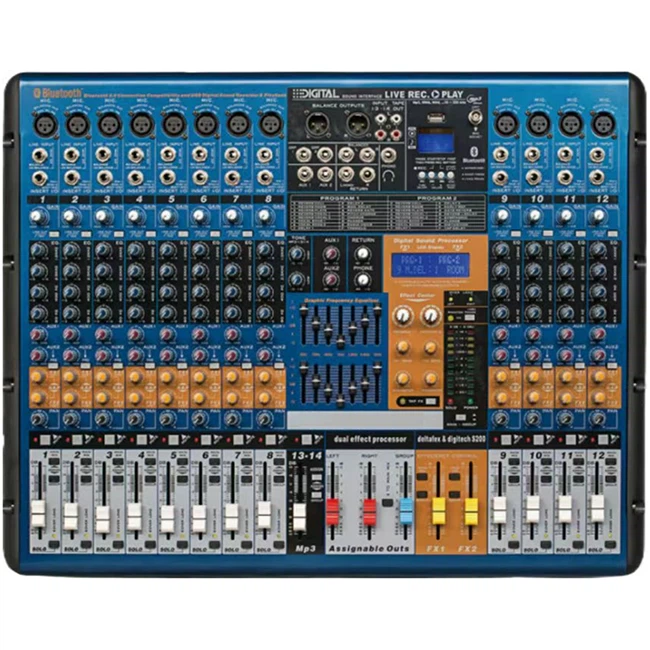
For example, if a guitar sounds too muddy, you can use the EQ to cut some of the low frequencies. Or if a vocal sounds too thin, you can boost the mid - frequencies to add more body. Experiment with the EQ settings on each channel until you get the sound you're looking for.
Compression
Compression helps to even out the volume of an audio signal. It reduces the dynamic range, making the louder parts quieter and the quieter parts louder. This can make the mix more consistent and easier to listen to.
Most mixers have a built - in compressor on each channel. You can adjust the threshold, ratio, attack, and release settings to control how the compressor works. Start with a gentle compression setting and gradually increase it until you achieve the desired effect.
Creating the Stereo Bus
Once you've got all your channels set up and adjusted, it's time to create the stereo bus. This is where all the individual channels are combined to create the final stereo mix.
On most mixers, you'll find a main output section. Make sure the main output is set to stereo mode. Then, use the faders on each channel to adjust the volume of each source in the final mix. You can also use the master fader to control the overall volume of the stereo mix.
Monitoring Your Mix
It's important to monitor your mix using good quality speakers or headphones. This will give you an accurate representation of how the mix sounds. Listen to the mix from different positions and at different volumes to make sure it sounds good in all situations.
Pay attention to the balance between the left and right channels. If one channel sounds louder or has a different frequency balance, you may need to go back and adjust the pan, gain, or EQ settings on the individual channels.
Fine - Tuning Your Mix
Once you've got a basic mix, it's time to fine - tune it. Listen for any elements that seem out of place or don't fit well with the rest of the mix. You might need to make further adjustments to the pan, EQ, compression, or volume settings.
Don't be afraid to experiment and try different things. Sometimes, a small change can make a big difference in the overall sound of the mix.
Final Checks
Before you call it a day, do a final check of your mix. Make sure all the audio sources are present and balanced, and that the stereo image is wide and engaging. You can also play the mix through different audio systems to make sure it sounds good everywhere.
If you're happy with the mix, you're ready to export it or use it for your live performance or recording project.
Let's Connect for Your Audio Mixer Needs
If you're interested in purchasing an audio mixer or have any questions about setting up a stereo mix, I'd love to hear from you. As an audio mixer supplier, I'm here to help you find the perfect mixer for your needs and guide you through the setup process. Whether you're a professional or just starting out, I've got the right equipment and expertise to support you. So, don't hesitate to reach out and let's start a conversation about your audio mixing requirements.
References
- "Audio Mixing Basics" - Various online audio engineering forums
- "The Art of Stereo Mixing" - Audio engineering textbooks from well - known publishers